Claude Code is great. I use it every day for work and my side projects. Personally though, besides work, it is also the most I have ever paid for any software: $170 a month (AUD).
I wouldn't mind so much if it wasn't that they also regularly lock me out. It usually happens at the worst time, for example Saturday mornings are great for my side projects, but it's pretty much guaranteed that I'll be locked by then until 11pm Saturday night.
They don't have to lock me out, there could be other options:
- They could rate limit me (making it slower to use); or
- They could downgrade me temporarly to a lower model (making it dumber).
Both of these options I'd notice much less than the total lockout that stops me using it altogether.
Here is what Anthropic achieves with the lockout: They force me to research and try out their competitors.
I'll still be using Claude Code and Anthropic for work (gratefully I don't personally pay for that), but for my personal use I'm working on getting away from it.
What I tried first
Another harness with local models. I have a good graphics card, but the models I tried were not just less capable than Claude Code with Opus, they were actually too stupid to really work with. I'm sure this will change in the coming years and local models will become more and more capable.
Another harness with cloud models through Open Router. This works well enough, but it is really hard to switch harnesses when you have built your whole workflow around Claude Code. If you aren't dependent on Claude Code yet, you should try picking an open harness, but for another harness to be useful to me I might have to do heavy customization or a rethink of my coding workflow. Not right now thanks.
Leaving Anthropic behind
Here is what is working for me now.
I've kept Claude Code as the harness, but swapped out the backend to something cheaper than Anthropic with no lockouts and more direct cost control.
Old way

New way

Models
These are two models I have tried so far:
deepseek-pro-latest: close to Opus 5.5 for performance, but seems cheaper.deepseek-v4.1-flash-1017: noticeably slower and dumber than Opus 5.5, but still very capable, more on par with Sonnet, this is definitely a fraction of the cost.
You can search all the available models and their prices on the Open Router models page.
Doing the setup yourself
If you don't have Claude Code, start with the install guide (but there's no need to login, because you won't be using the Anthropic backend).
Step 1. Make an Open Router account
- Go to openrouter.ai and sign up.
- Add credits. On the Credits page, put $10 on your account. This is prepaid credit, not a subscription. You only spend it when you use it and you can top up whenever you like.
- Set your daily and monthly credit limits, so you never burn through more than you meant to.
- Get your API key. On the Keys page, create a key and copy it. You need it soon.
Step 2. Connect to Open Router
Set the environment variables that point Claude Code at Open Router:
export OPENROUTER_API_KEY="<your-openrouter-api-key>"
export ANTHROPIC_BASE_URL="https://openrouter.ai/api"
export ANTHROPIC_AUTH_TOKEN="$OPENROUTER_API_KEY"
export ANTHROPIC_API_KEY="" # Important: must be explicitly empty
export CLAUDE_CODE_ENABLE_GATEWAY_MODEL_DISCOVERY=1 # Optional: adds the gateway model picker
! Be sure to use your own Open Router API key !
Step 3. Choose your models
If you want smart, use deepseek-pro-latest as your Opus replacement:
export ANTHROPIC_DEFAULT_OPUS_MODEL="~deepseek/deepseek-pro-latest"
export ANTHROPIC_DEFAULT_SONNET_MODEL="deepseek/deepseek-v4.1-flash-1017"
export ANTHROPIC_DEFAULT_HAIKU_MODEL="deepseek/deepseek-v4.1-flash-1017"
export CLAUDE_CODE_SUBAGENT_MODEL="deepseek/deepseek-v4.1-flash-1017"
If you want cheaper (but slower and bit dumber), use deepseek-flash for all of them:
export ANTHROPIC_DEFAULT_OPUS_MODEL="deepseek/deepseek-v4.1-flash-1017"
export ANTHROPIC_DEFAULT_SONNET_MODEL="deepseek/deepseek-v4.1-flash-1017"
export ANTHROPIC_DEFAULT_HAIKU_MODEL="deepseek/deepseek-v4.1-flash-1017"
export CLAUDE_CODE_SUBAGENT_MODEL="deepseek/deepseek-v4.1-flash-1017"
To make your configuration persistent, set these environment variables from your shell profile or configuration file.
Step 4. Start Claude Code
With the environment variables set correctly, run Claude:
claudeStep 5. Check your backend
In Claude, check status to make sure you are connected to Open Router:
/statusYou should see the Open Router auth token and URL.
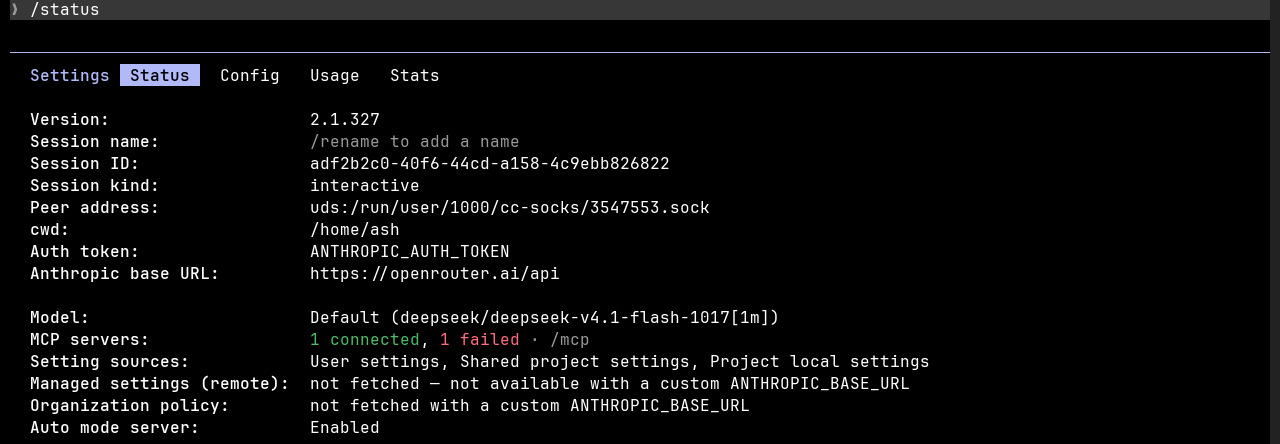
Then open the Open Router activity dashboard and check that requests are coming through.
Step 6. Check your model
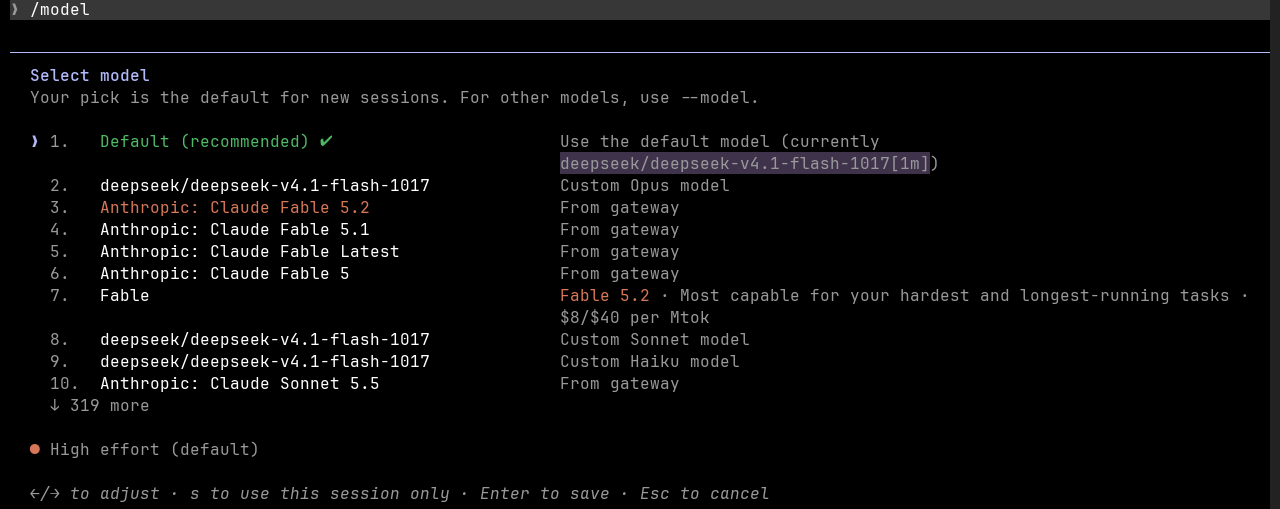
In Claude, check your model to make sure you are using the models you selected earlier:
/modelHere is what it looked like for me:
Watch your spend
Prices are hard to compare, because Claude doesn't really show how much you get for your money. They hide there per-token cost from you and they probably change it without telling you. (I wouldn't be surprised if they do surge pricing.)
With Open Router you pay as you go. You only add credits when you need them. It never cuts you off unless you run out of credits. You stay in control of how and when you use it and how much you spend.
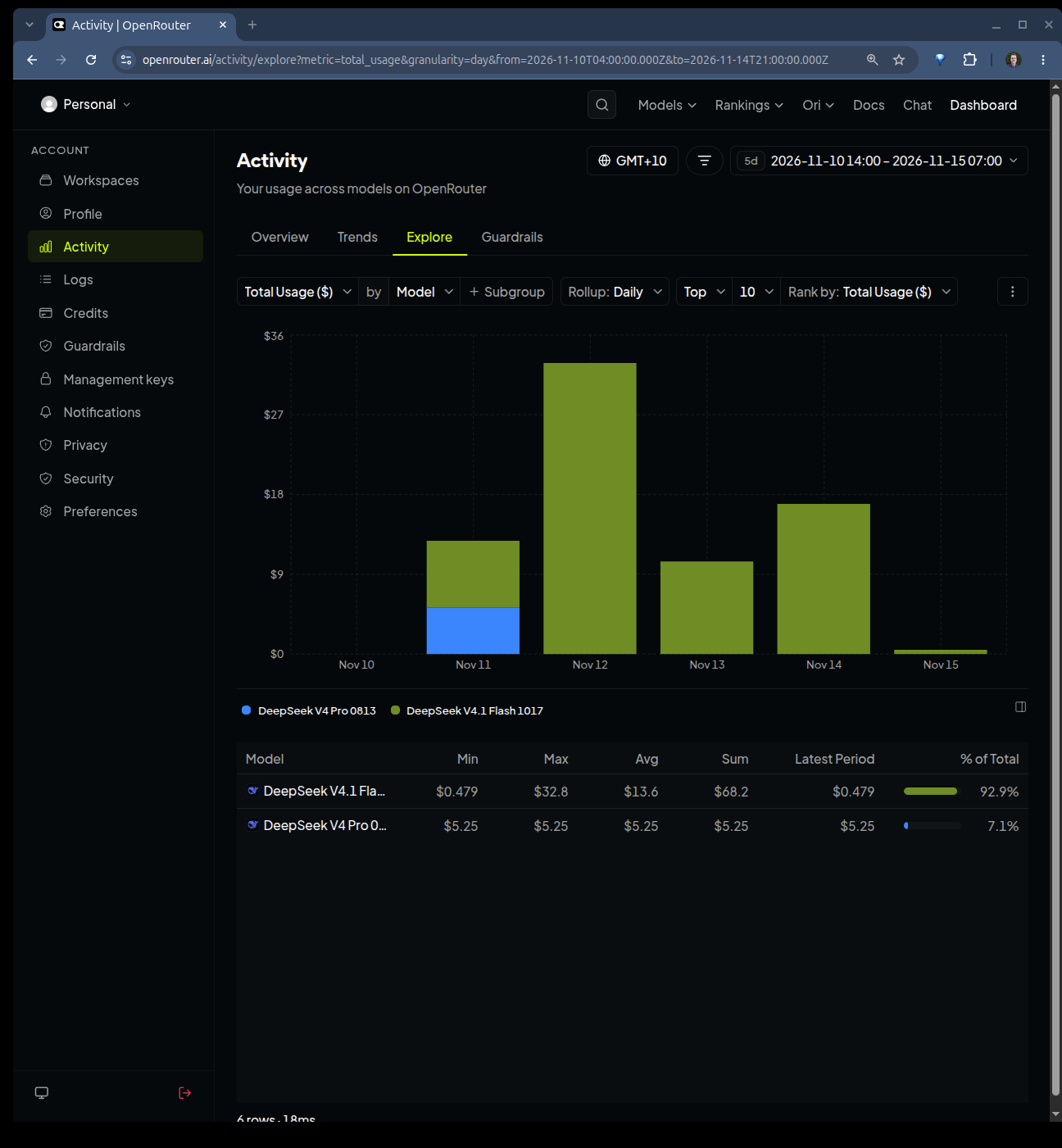
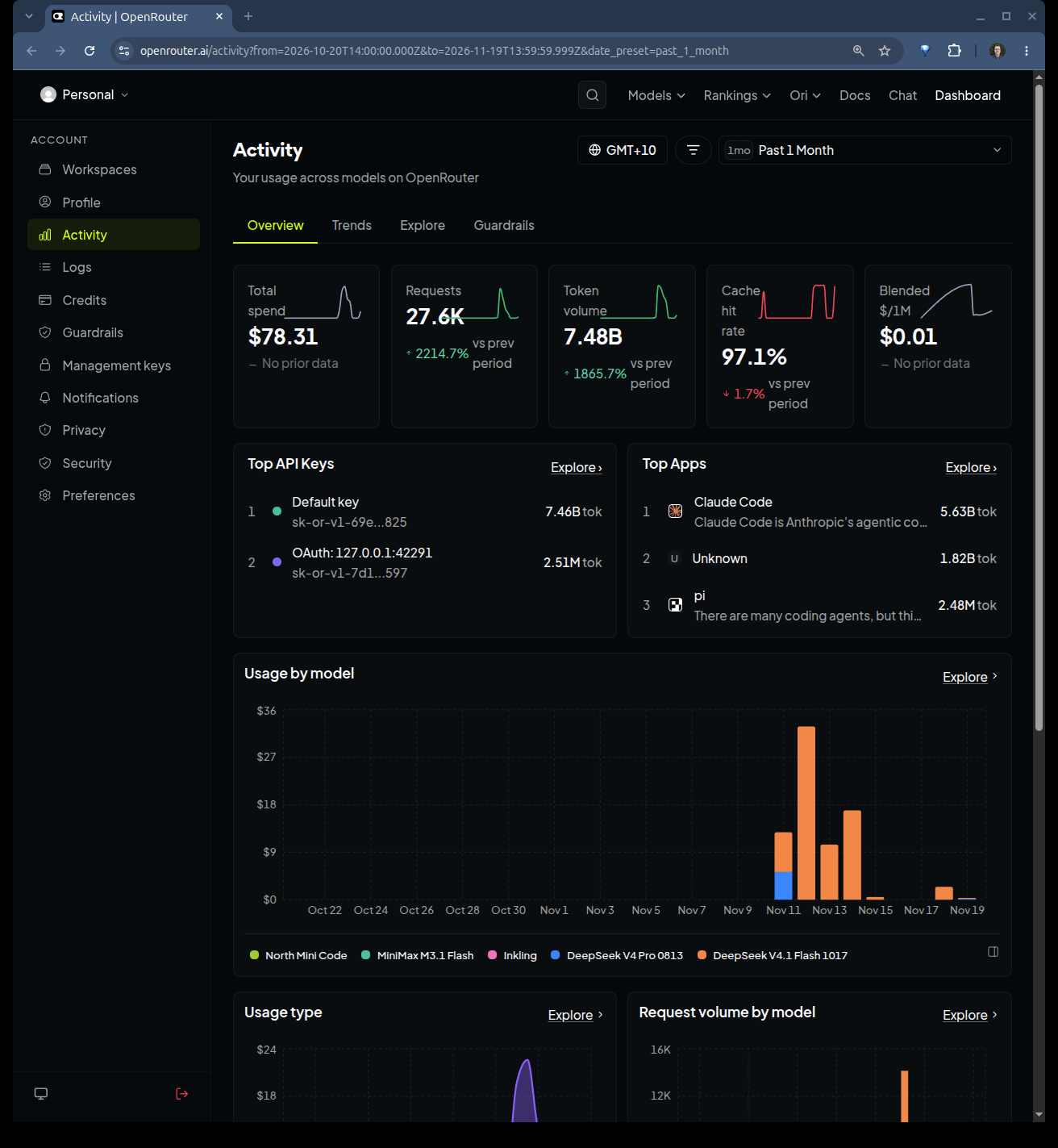
One great thing from Open Router is being able to watch your spend as you go.
Here is an example of day by day cost per model:
Here is an example of hour to hour cost per model:
Wrap up
I'm switching to this setup for a month or two and I'll post an update on how the transition went and how much it cost.
One more thing worth trying: Open Router's cost tracking status line, so you can watch the spend as you go.


