How many times a day do you hit a command approval in Claude Code and just tap "yes"?
If you use Claude every day like I do, the answer is a lot. And each one is a tiny tax on your attention. The approval pops up, you are meant to read the command inside it, understand it, and decide if it is safe. Do that hundreds of times in a day and something breaks: you stop reading them, and you just hit Y for everything.
That is permissions fatigue. It's a dangerous place to be. You stop looking at the commands and instead are now blindly accepting them.
So I built a plugin to fix it. It is called expressive-permissions, it is open-source, and you can find it on my GitHub. This post walks through the problem it solves and how I use it to be more effective with Claude, making it more autonomous, but without giving up safety.
This blog post accompanies the video: https://youtu.be/slR4_lNfcbc
The approvals start out easy
Let's start with an approval that is easy to say yes to.
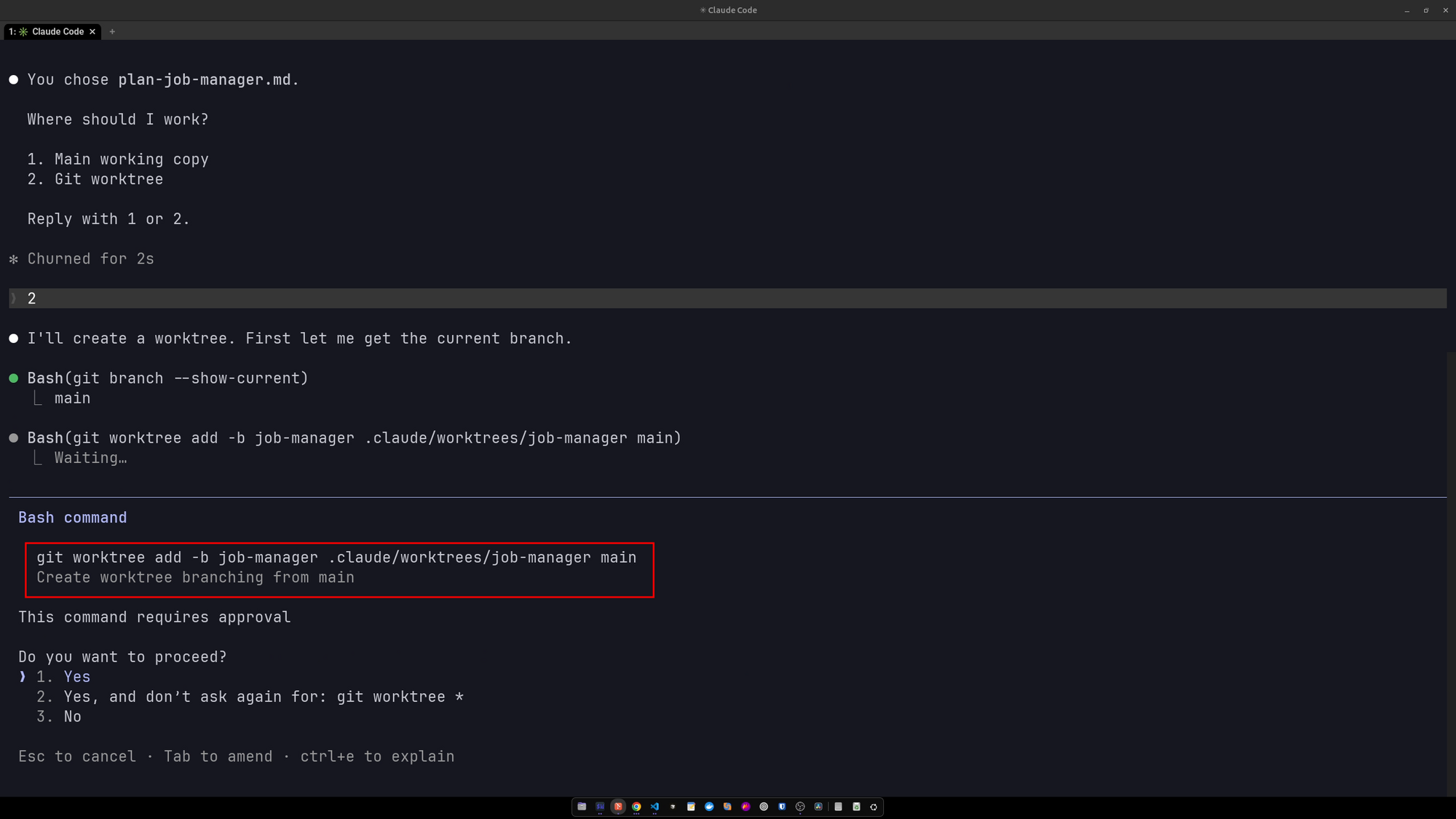
Figure 1. Claude asks to create a git worktree. This is a simple command, and it is easy to allow it with either the built-in permission system or my plugin.
I'm ok with this command. Claude wants to create a worktree so it can work on the repo in parallel. Creating and destroying worktrees within the current project is safe, and Claude should always be allowed to do it, so I want this allowed without an approval. Claude Code's built-in permissions handle this case well. You allow git worktree once and you are done.
If every command looked like this, there would be no problem and no plugin. But most commands Claude throws at you are way more complicated than this.
Then the approvals get complicated
Here is an approval Claude asked me for while it was setting up a project.
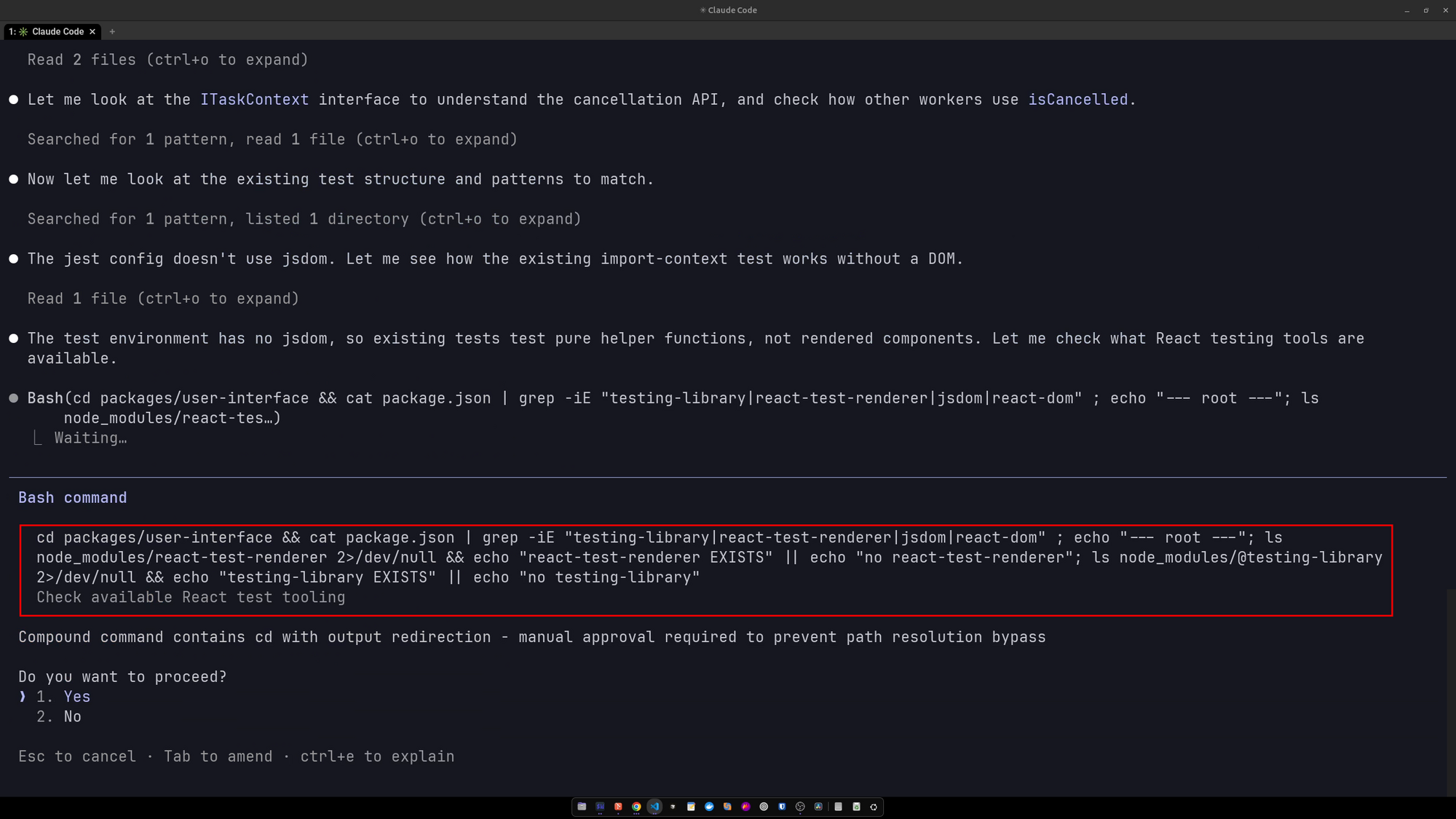
Figure 2. A compound command that changes directory, greps a package.json, redirects output, and chains several checks together. All of it is safe, but you have to read the whole thing to know that.
Look at what is actually in there. A cd into a package, a cat piped into grep, a couple of ls checks with 2>/dev/null, and some echo output stitched together with && and ||. Every piece is read only. Nothing here is dangerous.
But you have to read the entire thing to be sure of that.
This is where the built-in permissions system fails us. You cannot write a rule that reliably allows a command like this, because you cannot predict the next arrangement of commands Claude will throw at you.
Say you approve this exact combination. Next time Claude tacks a different check on the end, or reorders the pipe, or generates output into a file named after a random GUID. Your rule no longer matches. The approval comes back.
I hit this again and again, frequent approvals for safe commands with no predictable way to allow them ahead of time. What I needed was a new permissions system that could automatically and deterministically allow safe commands, so the only approvals you actually see are the ones for commands that could genuinely cause a problem.
A permission system that understands commands
The reason the built-in rules struggle is that they match on plain text, without understanding the structure of a command. expressive-permissions parses each command properly and matches on the actual structure of commands.
Every time Claude wants to run a command, the plugin parses it into an abstract syntax tree (an AST). It then walks that tree and applies your rules to each subcommand (each node of the AST) independently.
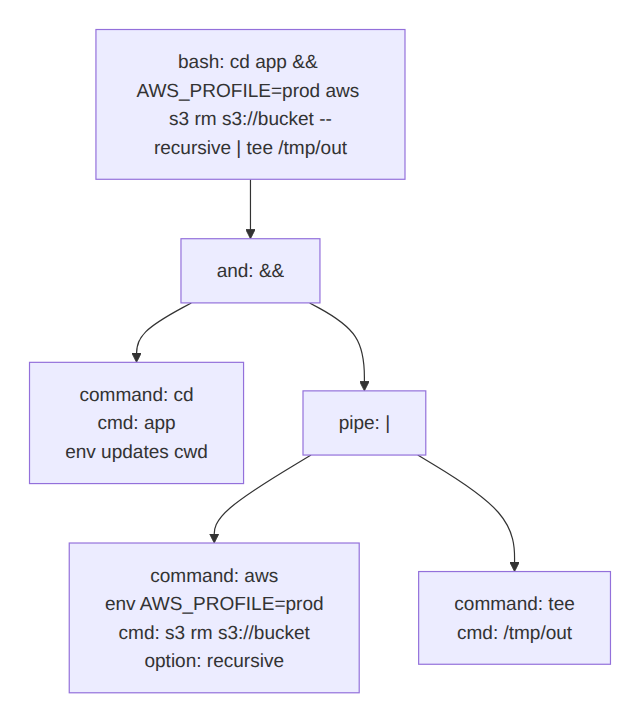
Figure 3. A command parsed into an abstract syntax tree. The plugin evaluates each subcommand on its own, so it sees the aws s3 rm --recursive buried in the pipeline regardless of what surrounds it.
This is the whole idea. It does not matter where a subcommand sits in the pipeline, or what is chained before and after it. If there is a git status somewhere in the tree, a rule for git status finds it. If there is an rm -rf buried in the middle, a rule for rm -rf finds that too and blocks the lot.
Claude cannot route around this. The plugin runs as a Claude Code hook, so it sees every command before it executes, and there is no path that lets it skip expressive-permissions and its job of allowing what is safe and blocking what is dangerous.
Getting the plugin
Installing it takes three commands inside Claude Code:
/plugin marketplace add ashleydavis/expressive-permissions
/plugin install expressive-permissions@codecapers
/reload-plugins
That is it. The README has the full instructions, and if you would rather run it from source you can clone the repo and hook it into your global Claude settings directly. For everything beyond installation, the documentation site covers configuration, debugging, and the full rule syntax.
By the way, this mostly works under Cursor as well, since Cursor reads much of the same configuration as Claude. I use it with both, though Claude is where I spend most of my time and where I have tested it the most. One caveat: Cursor does not yet support the ask result from the hook, so instead of asking you for approval it displays an error when a command comes back as ask. The allow and deny results work fine.
Writing a rule
Rules are YAML, and they mirror the structure of the command. Here is one that always allows git status:
bash:
  git:
    status:
      decide: allow
No matter where git status appears in a command, that rule allows that part of the tree.
Denials work the same way. This one blocks rm -rf in any form, anywhere:
bash:
  rm:
    options:
      - r|recursive
      - f|force
    decide: deny
    reason: rm -rf in any format is not allowed
Because the plugin matches the rm node wherever it lives in the tree, Claude cannot sneak a recursive delete into the middle of an otherwise innocent pipeline. The deny wins and the whole command is blocked.
Rules live in .claude/permissions.yaml, or you can split them across .claude/permissions.d/*.yaml to keep things tidy. Run /reload-plugins after you edit them. The configuration reference covers every option in detail.
Four decisions, strictest wins
Every rule ends in a decision, and there are four of them: allow, ask, deny, and abstain (meaning "this rule has no opinion").
When the plugin walks the tree, it collects a decision for every part. Then it combines them with one simple rule: the strictest one wins.
| Priority | Decision | Meaning |
|---|---|---|
| 1 (strictest) | deny |
Never run this, no matter what else says otherwise. |
| 2 | ask |
Stop and get my confirmation. |
| 3 | allow |
Safe to run without asking. |
| 4 (weakest) | abstain |
This rule has no opinion. |
The strictest decision anywhere in the command decides the outcome.
So a command is only allowed to run silently when every part of it comes back allow. One ask and Claude stops to check with you. One deny and it is blocked outright, even if everything else was fine. That is what keeps you safe while still letting safe commands through.
Why I call it "expressive"
Matching a command name is just the start. You can also match on the conditions around it:
cwdfor the working directory.cmdfor positional arguments.optionsfor CLI flags.envfor environment variables.filefor whether a file exists or what it contains.
Fields within a rule are combined with AND, and you can invert any of them with not:. That is where the expressiveness comes in. You are not just saying "allow this command", you are describing the exact conditions under which it is safe.
Here's something more complex. Allow the AWS CLI, but only when it is pointed at the sandbox profile, and refuse it everywhere else:
bash:
  aws:
    - not:
        env:
          AWS_PROFILE: sandbox
      decide: deny
      reason: "Only sandbox profile permitted"
    - decide: ask
Or match on external state. This one auto-allows use of kubectl, but only my current context is a dev cluster (by convention, one whose name ends in -dev), and it asks me about everything else:
bash:
  kubectl:
    - file:
        ~/.kube/config:
          contains: "/current-context: .*-dev/"
      decide: allow
      reason: kubectl is safe against a dev cluster
    - decide: ask
It reads the current context straight out of my kubeconfig, so I can let Claude run kubectl freely against a dev cluster while still being asked before it touches production.
There is a lot more in the documentation, including a quick reference for the rule syntax and a guide to protecting production.
How it all fits together
Here is the full path a command takes, from Claude wanting to run it to the result landing in the audit log.
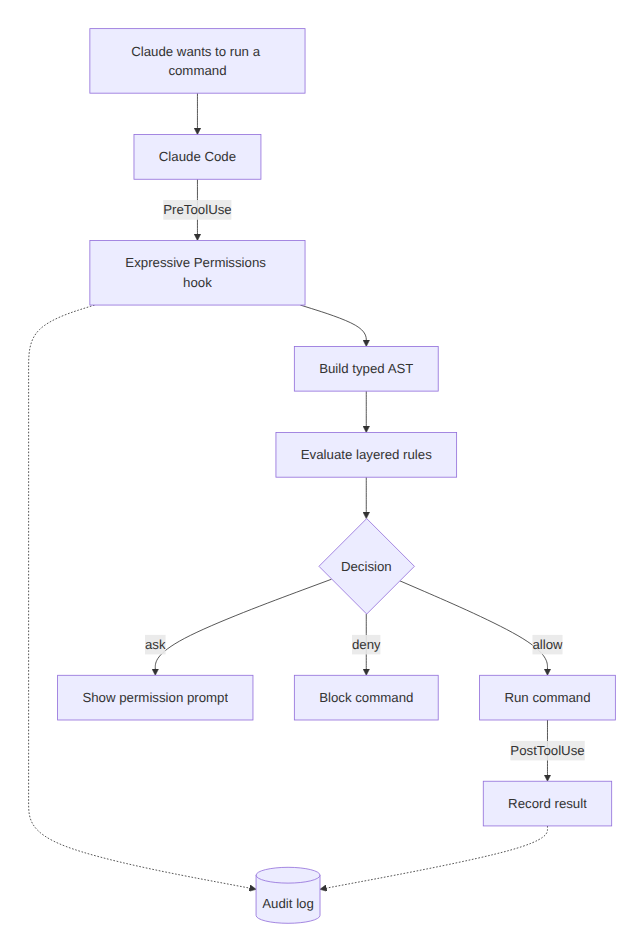
Figure 4. Claude Code hands each command to the plugin, which builds the AST, evaluates your rules, and returns allow, ask, or deny. Every decision and every execution is recorded in the audit log.
The config grows with you
I did not write all my rules in a day. I started small and added a rule every time an approval for a safe command interrupted me for no good reason.
You can see the exact permissions configuration I run across my machines in my claude-config repo. It is split into many files, one per tool or concern: read-only git, read-only kubectl, gh, helm, file writes, and more. The git read-only file is a good example: git status, git log, git diff, and the rest are all set to allow, while anything that changes state (commits, pushes, and so on) falls through to ask, so the read-only operations are automatically approved and I get to approve or deny everything else.
The more I use it, the more autonomous Claude becomes, and the fewer times it stops to ask me about the boring, safe, read-only things it should always be allowed to do.
That is the compounding payoff. Your config is just files, so you can review it like code, share it, and copy the good bits between projects.
The pending approvals log
When Claude surfaces an approval, how do you know which part of the command caused it?
The moment a command comes back as ask, the plugin writes a file into .claude/permissions-log/pending/. You can read it while the approval prompt is sitting in front of you.
The file explains why the command was not automatically approved. You can see which parts were allowed, which matched a rule, and which matched nothing at all. Here is an example:
# Bash — ASK

## Verdict
decision: ASK
source: no rule matched
cmd: du -sh node_modules
command directory: .../apps/cli

## Parsed command tree
cd .../apps/cli && du -sh node_modules
├── cd .../apps/cli
│     decision: ALLOW
│     rule: ~/.claude/permissions.d/bash-readonly.yaml:17
│     reason: "cd targets under the project"
└── du -sh node_modules
      decision: NOMATCH
Instead of trying to understand a long complex command in Claude's approval prompt, I open the pending file to see the whole thing structured in a way that makes it easier to see the parts. From here I can decide to allow or deny the command, and if there are parts of the command that should always be allowed I can update the rules to automatically allow those in the future.
The audit log
The audit log is a very important part of expressive-permissions. It records every command evaluated by the plugin, which rule matched, and what the decision was. It also records everything Claude actually executed. Here is a taste of what it looks like:
20:15:24  RULE     "git status" -> bash-git-readonly.yaml:17 -> allow "Read-only status check"
20:15:24  NOMATCH  "awk '{print $2}'"
20:15:24  NODE     "... | awk '{print $2}'" -> ask
20:15:24  EXECUTE  Bash "bun run test:cli"
When an approval comes back and asks me and I cannot tell why, the log tells me exactly which subcommand had no matching rule (an awk in that example, which I have deliberately not allowed yet, because I always want to know when it runs).
And when I approve something in a hurry and then think "wait, what did I just say yes to", I can open the log and see precisely what Claude ran. It is a full history of everything that happened in a project, and it is worth its weight the first time you need it.
Wrapping Up
Claude Code's built-in permissions are fine for simple commands and painful for everything more complicated. They match on text, so they cannot keep up with the endless combinations Claude invents. The permissions fatigue that follows puts you at real risk of accidentally approving something dangerous.
My expressive-permissions plugin fixes this. It matches on structure instead. It parses every command into an AST, applies granular rules to each subcommand, and lets the strictest decision win. Safe commands run without interrupting you, dangerous ones are blocked no matter where they hide, and everything else falls back to you for a manual approval. The result is fewer interruptions, more autonomy, and a permissions config you can read and review like any other code in your repo. The more you refine it, the more Claude can run (safetly) on its own.
Links
- The plugin: github.com/ashleydavis/expressive-permissions
- The documentation: ashleydavis.github.io/expressive-permissions
- Example permissions config: my claude-config
- The video that goes with this post: https://youtu.be/slR4_lNfcbc